
Home > Vantron Technology > Vantron Technology R105 Router User Manual
Vantron Technology R105 Router User Manual




Vantron| Embedded in your success, Embedded in your better life
World-leading provider of embedded/IoT products and solutions
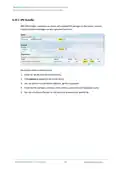
3.13.5 Mount Points
You can enable/disable automount and check the mounting information here.
Description of the numbered areas
1. Disable/Enable automatic mount
2. File path on the Router
3. Mount point
4. Available space in the mount point
5. Space used in percentage
6. If you have previously mounted a file to the device, you can manually unmount the file
here
To manually mount a file, click the Click Disable Automount button first and then proceed
with the settings.
R105 Industrial Router | User Manual
107

| General | Details |
|---|---|
| Name | Vantron Technology R105 Router User Manual |
| Make | Vantron Technology |
| Language | English |
| Filetype | PDF (Download) |
| File size | 0.51 MB |
 (1 votes, average: 5.00 out of 5)
 Loading...
If you have any questions regarding Vantron Technology R105 Router User Manual, please ask here and describe the problem in detail.


REGIN M4G951 Router Instructions

Adtran SDG-8610 Service Delivery Gateway WiFi 6 Gigabit Router Instruction Manual

ASUS ZenWiFi BD4 Dual Band Wi-Fi Router User Guide

CASTLENET EBM552U Mesh Wi-Fi Router Installation Guide

D-Link DIR-601 Wireless-N 150 Home Router Instructions

Aetheros ESRMKV2C AOS Edge Server Router User Manual

MERCUSYS BE3600 Dual-Band Wi-Fi 7 Router Installation Guide

MICRONET AX1800 Dual Band Wi-Fi 6 Router User Guide

HIKVISION AX1500 Pro WiFi Router User Guide

Helmholz LTE11 Router Owner’s Manual