
Home > intwine connected > intwine connected ICG-150 Gateway 150 Cellular Router User Guide
intwine connected ICG-150 Gateway 150 Cellular Router User Guide




ICG-150 USER GUIDE
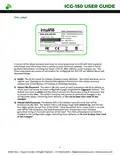
The Label
A variant of the above pictured label ships on every producton ICG-150 with both standard
informaton and informaton that is specific to each individual Gateway. The label is full of
pertnent informaton including the router’s FCC ID, MAC address, serial numbers, etc. The
three most important pieces of informaton for configuring the ICG-150 are labeled above and
described below:
1) IGUID: The IGUID stands for Intwine Globally Unique Identfier. The IGUID will allow you to
register your Gateway to the Remote Management Portal and is the easiest and most
assured way of identfying and tracking an individual Gateway.
2) Admin URL/Password: The admin URL (the same on each Gateway) is the local address at
which users can access the local configuraton pages (explained in Logging In secton). The
default username is admin and the default password is the unique string of characters that
is printed on the label. The admin username and password can both be changed in the
configuraton pages, overriding these defaults, so be sure to keep close track of any
changes!
3) Default SSID/Password: The default SSID is the wireless network name that will be
broadcast by the 4GR. The default SSID is will always begin with intwine-icg- and the last
four digits will be the last four of the IGUID. Since the default Wi-Fi access point is secured
with WPA2 PSK encrypton, the default password (pre-shared key) is the randomly
generated string of characters printed on the label. The SSID and password can both be
changed in the configuraton pages, overriding these defaults, so be sure to keep close track
of any changes!
8
©2022 Rev 1. Intwine Connect. All Rights Reserved. | +1(216)314-2922 | info@intwineconnect.com | intwineconnect.com

| General | Details |
|---|---|
| Name | intwine connected ICG-150 Gateway 150 Cellular Router User Guide |
| Make | intwine connected |
| Language | English |
| Filetype | PDF (Download) |
| File size | 0.51 MB |
 (1 votes, average: 5.00 out of 5)
 Loading...
If you have any questions regarding intwine connected ICG-150 Gateway 150 Cellular Router User Guide, please ask here and describe the problem in detail.


ZYXEL NETWORKS 2AU6R03993 Security Router User Guide

GlocalMe G4 Pro 4G LTE Mobile WiFi Router User Guide

MOXA EDR-810 Secure Router Installation Guide

D-Link G530 5G NR AX3000 Wi-Fi 6 Router User Guide

robustel R5020 5G WiFi Wireless Router Owner’s Manual

MERCUSYS MR90X Dual Band 8 Stream Wi-Fi 6 Router User Guide

hyperoptic EX3301 Hyperhub Router Instruction Manual

LINOVISION IOT-R32W Unlocked 4G LTE Router User Manual

Wi-Tek WI-R3 1200Mbps Dual-Band Wireless Mesh Router with PoE Passthrough Installation Guide

SWAGTEK M1C 4G LTE Mobile Router Installation Guide