
SKIL RT1323-00 10 Amp Fixed Base Corded Router Owner’s Manual






























c. Align the raised ribs of the battery pack with the slot in the
charger.
d. Insert the battery pack into the charger (Fig. 2).
e. The charger will communicate with the battery pack to evaluate
the condition of the battery pack.
f. The charger will charge the battery automatically.
Please refer to the charger manual for detailed charging operation.
NOTICE: If the battery pack cannot accept a charge, the contacts
of the charger or battery pack may be contaminated. Clean the
contacts of the charger or battery pack (e. g. by inserting and
removing the battery several times or scrubbing with a cotton swab
and alcohol), or replace the battery pack, as required.
Defective Battery Pack
If the charger detects a problem, the red Defect Indicator will begin
flashing. Remove and re-insert the battery pack in the charger. If
the Defect Indicator flashes a second time, try charging a different
battery pack.
a. If a different battery pack charges normally, have the first
defective battery pack serviced by an Authorized SKIL Service
Station.
b. If a different battery pack also indicates “defective,” the charger
may be defective. Have the charger serviced by an Authorized
SKIL Service Station.
15

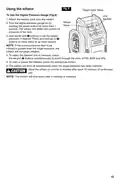
USB Charging Port (Fig. 3)
Fig. 3
The battery pack has a USB port,
which can provide 5V 1A output
when the battery is not depleted.
Fuel Gauge
a. Connect an appropriate device
to the battery (cell phone,
tablet, etc.) to a standard USB
cable.
Battery
Indicating
Button
b. Depress the battery indicating
button to activate the charging
function. During the charging,
the fuel gauge will flash green.
USB Charging
Port
Do not use the battery pack to charge
another device when the battery pack is
WARNING
charging. Discharging and charging in the same time may
cause damage to the battery pack, and possible personal
injury.
Fuel Gauge
The four LEDs on the rear housing of the battery comprise the Fuel
Gauge, indicating the current battery capacity when the battery-
indicator button is depressed.
The first LED of the fuel gauge will flash green when low battery.
Recharge the battery pack as needed.
To Attach/Detach Battery Pack
Follow the instructions in the Owner’s Manual for the individual SKIL
tool.
16

| General | Details |
|---|---|
| Name | SKIL RT1323-00 10 Amp Fixed Base Corded Router Owner’s Manual |
| Make | Skil |
| Language | English |
| Filetype | PDF (Download) |
| File size | 7.63 MB |
 (1 votes, average: 5.00 out of 5)
 Loading...
If you have any questions regarding SKIL RT1323-00 10 Amp Fixed Base Corded Router Owner’s Manual, please ask here and describe the problem in detail.


EnGenius XG60-FIT FitXpress 4 port Gigabit PoE plus VPV Router Owner’s Manual

WIFI DUOBOOST LV-WR16 WiFi Mini Router Installation Guide

SENWA VOLTE 2AZYA 4G LTE CPE Router User Manual

vantiva MGA5331 Unveils FWA Modem and Wi-Fi Router User Manual

UfiSpace S9600-32X 100G Aggregation Router Installation Guide

TELTONIKA Networks RUT241 LTE Router User Guide

ASUS GT-BE98 Quad Band Gaming Router User Guide

Tenda F3 300Mbps Wireless Router User Guide

TP-Link Archer BE550 Pro Tri-Band Wi-Fi 7 Router Instructions

ASUS RT-AX57 AX3000 Dual Band WiFi Router User Guide