
SKIL RT1323-00 10 Amp Fixed Base Corded Router Owner’s Manual
















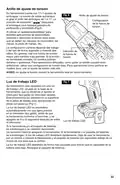




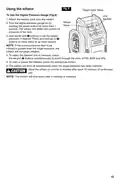








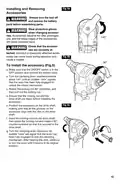


Fig. 8
Using the Inflator
Target Input Value
To Use the Digital Pressure Gauge (Fig.8)
Unit
Applied
1. Attach the battery pack onto the inflator.
Actual
Value
2. Turn the digital pressure gauge on by
pushing the power button for more than 1
second. The inflator will detect the current air
pressure of the item.
I
S
P
3. Use the
pressure, if desired. Press and hold
and
buttons to set the target
or
buttons to move down or up more quickly.
NOTE: If the current pressure item to be
inflated is greater than the target pressure, the
inflator will not begin inflation.
4. To select the desired unit of pressure, press
the
and
buttons simultaneously to scroll through the units of PSI, BAR and kPa.
5. To start or pause the inflation, press the start/pause button.
6. The inflator will shut off automatically when the target pressure has been reached.
Allow the inflator to cool for 5 minutes after each 15 minutes of continuous
CAUTION
use.
NOTE: The inflator will shut down after 5 minutes of inactivity.
13

| General | Details |
|---|---|
| Name | SKIL RT1323-00 10 Amp Fixed Base Corded Router Owner’s Manual |
| Make | Skil |
| Language | English |
| Filetype | PDF (Download) |
| File size | 7.63 MB |
 (1 votes, average: 5.00 out of 5)
 Loading...
If you have any questions regarding SKIL RT1323-00 10 Amp Fixed Base Corded Router Owner’s Manual, please ask here and describe the problem in detail.

TAIKO AUDIO 92592129 Extreme Router User Manual

TP-Link C201-V5 Wireless Dual Band Router User Guide

ZYXEL LTE3301-PLUS 4G LTE-A Router User Guide

Netcomm NF18MESH Upgraded WiFi Router User Guide

ZTE MF296C WiFi Router User Manual

ZYXEL NR2301 5G NR Portable Router User Guide

TP-Link BE11000 Tri Band Wi-Fi 7 Gaming Router User Guide

Calix BLAST u6 Gigaspire Mesh WiFi 6 Router User Guide

NETGEAR RS150 Nighthawk Wi-Fi 7 Dual Band Router User Manual

TP-Link E4 deco Router Installation Guide