
×
- 1. Dynalink Dl-wrx36 (Faq & Troubleshooting)
- 2. What Is Wi-fi 6? (Login, Password, Firmware And Reset → How To Reset Dl-wrx36 Router To Factory Default Settings? → How To Update The Routers Firmware To The Latest Version? → Does The Dynalink Router Support The Access Point (ap) / Bridge Mode? → What Is The Difference Between The Router And Access Point Mode? → Can Multiple Dl-wrx36s Establish A Mesh Network Connection?)
- 3. Configuratio (Dynalink App → Compatibility → How To Set Up Pptp Vpn Client On The Dynalink Router? → How To Set Up Openvpn Server On The Dynalink Router? → How To Set Up Openvpn Client On The Dynalink Router? → Can I Combine The 2.4 & 5 Ghz Bands To A Single Ssid On The Dynalink Wi-fi 6 Ax3600 Router?)
- 4. Troubleshooting (Webgui → Access To The Internet → Wi-fi Connectivity → Dynalink App & Google Assistant → Performance → Security)
- 5. Before You Buy (What Is Wi-fi 6? → What Is The Difference Between Wi-fi 6 And Wi-fi 5? → What Is Mu-mimo?)
- 6. Installation (Setup → Configuration → Troubleshooting → Faq → Wireless Characteristics)
- 7. 4ghz Vs 5ghz Frequency Characteristics (Ghz Channel Options And Interference → Qam Explanation)
- 8. Login,password,firmwareandreset (Password&timezone → Wi-fi6(802.11ax) → Quadratureamplitudemodulation(qam) → Ofdma(orthogonalfrequency-divisionmultipleaccess) → Routerorapcommunication → Simultaneoustransmissions)
- 9. What If I Forget My Login Password? (How To Reset Dl-wrx36 Router To Factory Default Settings?)
- 10. Factory Reset (Reset The Router To Default Via Webgui Or App → System Settings → Configuration & Reset → Reset To Default → Dynalink App)
- 11. Dynalink (Faq & Troubleshooting → Dynalink Webgui)
- 12. Firmware Update Importance (Firmware File Availability → Dual Image Mechanism → Online Fota Update)
- 13. Faq & Troubleshooting (Quick Installation Guide → User Guide → System Settings → Firmware)
- 14. Launch The Dynalink Ap (How To Update The Routers Firmware To The Latest Version → Dynalink Webgui)
- 15. Update To The Latest Firmware Version
- 16. Dynalink (Faq & Troubleshooting → Dynalink App → Check The Current Firmware Version)
- 17. Update To The Latest Firmware Version (What If I Cannot Connect To Dynalink Wi-fi Or Login To Webgui With Default Password On The Label?)
- 18. Features (Dhcp Normal Mode → Hardware Reset)
- 19. Dynalink Dl-wrx36 Installation Guide
- 20. Dynalink Router Setup (Dynalink Router Configuration → Dynalink Router Firmware Version → Access Point Mode Support → Bridge Mode Support → Faq & Troubleshooting)
- 21. Dynalink (Faq & Troubleshooting → Dynalink App)
- 22. Router Mode (by Default) (Access Point (bridge) Mode)
- 23. Dynalink Dl-wrx36 Installation (Dynalink Dl-wrx36 Configuration → Dynalink Dl-wrx36 Usb Support → Dynalink Dl-wrx36 Vlan Support → Dynalink Dl-wrx36 Mesh Network Support → Dynalink Dl-wrx36 Channel Bandwidth Support)
- 24. Configuration
- 25. Dynalink (Faq & Troubleshooting → Dynalink Webgui)
- 26. Dynalink Dl-wrx36 (Faq & Troubleshooting → Wake-on-lan Feature)
- 27. Installation (Setup → Configuration → Vpn Function)
- 28. Dynalink Wi-fi 6 Ax3600 Router Setup (Band-steering Function → Wi-fi Settings → App Configuration → Webgui Configuration)
- 29. Dynalink (Faq & Troubleshooting → Dynalink Webgui)
- 30. Lan Security
- 31. How To Set Up Pptp Vpn Client On The Dynalink Router? (Go To Webgui And See Security > Vpn > Vpn Client, Select Vpn Type To Pptp.)
- 32. Enter Username And Password (Enable Default Router → Apply Settings → Activate Vpn Tunnel)
- 33. Dynalink Dl-wrx36 Installation (Connection Status → Deactivate Vpn Tunnel)
- 34. How To Set Up Openvpn Server On The Dynalink Router? (Login With The Username And Password You Set Up For Your Router Account Via Webgui. → Go To Security > Vpn > Openvpnserver And Enable It. → Export The Openvpn Configuration To File (client.ovpn). → Select The Advanced Settings And Select Internet And Local Network.)
- 35. Modify Your Ovpn File Manually To Update Your Correct Ip Address. Use A Wordpad To Open The Exported Client.ovpn File, You Will See The Firs…
- 36. Faq & Troubleshooting (Replace Ip Address In Client.ovpn → Add User Name And Password For Login)
- 37. Your Dynalink Router Connects To A Modem In Most Cases. (Set Up Your Vpn Client On The Windows Pc. → From The Open Vpn Client, First Import The Openvpn Configuration File (client.ovpn).)
- 38. How To Set Up Openvpn Client On The Dynalink Router? (Setting Up Openvpn Client Is Much Simpler Than Setting Up The Openvpn Server. → Warning: You Need To Set Up The Openvpn Server First Before You Can Set Up Openvpn Client. → After You Set Up The Vpn Server, You Will Get A Ovpn File And A Set Of Login/password.)
- 39. Go To Webgui > Security > Vpn > Vpn Client (Select Vpn Type To Openvpn → Enter Username And Password If The Openvpn Server Use Username/password → Select Yes On Enable Default Router → Click Apply When Finished → Click Activate To Activate This Vpn Tunnel)
- 40. Dynalink Dl-wrx36 Installation Guide
- 41. Dynalink App (android / Ios) (Connected Devices → Wi-fi (wi-fi Devices) → Lan (lan Devices))
- 42. Dynalink Dl-wrx36 Installation/setup/configuration
- 43. Dynalink Webgui (Parental Control)
- 44. Client Acl
- 45. Dynalink App (Webgui → Registering Dynalink Account → Configuring Dynalink Wi-fi → Using Dynalink App Without Internet → Advanced Network Options)
- 46. Setup Dynalink Account (Configuring Dynalink Router → Internet Connection Issues → Using Dynalink App → Dns Settings For Dynalink Router)
- 47. Compatibility (Dynalink Router Support For Amazon Fire Tv Dongle On 5ghz → Dynalink Router Support For Nintendo Switch On 5ghz → Manual Selection Of 5ghz Wi-fi Channel → Disabling Band-steering Function)
- 48. Dynalink (Faq & Troubleshooting → Dynalink Webgui → Webgui > Network > Wi-fi > Band Steering)
- 49. Webgui (Network → Wi-fi → Radio → Advance Setting)
- 50. Dynalink (Faq & Troubleshooting → Dynalink Webgui)
- 51. Dynalink Dl-wrx36 Faq & Troubleshooting
- 52. If You Have A Centurylink Modem/router, You Can Connect Dynalink Router Wan Port To Centurylink Modem/routers Lan Port And Start To Enjoy Wi…
- 53. Dynalink Dl-wrx36 (Faq & Troubleshooting → Disable Wi-fi On Verizon 5g Gateway → Reboot Your Dynalink Router → Webgui > Network > Wi-fi > Radio)
- 54. Dynalink (Faq & Troubleshooting → Ghz → Does Dynalink Wi-fi Support At&t Xdsl?)
- 55. Dynalink Wi-fi Setup (Best Performance Tips → Change Dynalink Router Wan Mtu → Try Both Lan Ports → Disable Wi-fi On Tmo 5g Gateway → Use Different Wi-fi Channels)
- 56. Installation With Comcast Xfinity Internet (Troubleshooting Internet Connection Issues After Firmware Upgrade → Automatic Mtu Feature And Its Impact On Connectivity)
- 57. Faq & Troubleshooting (Led Indicator Issues → Firmware Upgrade Concerns → Internet Connection Detection → T-mobile Compatibility Issues)
- 58. Troubleshoot The Router Hardware (Ping The Router From Your Computer)
- 59. The Default Gateway Ip Of The Router Is 192.168.216.1 Type 'ping 192.168.216.1' And Then Press Enter. If The Connection Is Working, A Succes…
- 60. Dynalink Dl-wrx36 Faq & Troubleshooting
- 61. Dynalink Dl-wrx36 Installation Guide
- 62. Wi-fi Connection Quality (Verify Wi-fi Network Name (ssid) And Password → Using Dynalink Webgui)
- 63. Webgui (Access To The Internet)
- 64. Internet Connection Type (Mtu Value Configuration → Automatic Mtu Feature → Mtu Settings For Cable/dsl/fiber Users → Mtu Settings For 5gnr Home Internet Users)
- 65. Wi-fi Connectivity (Cannot Find The 2.4/5ghz Wi-fi Network → Why I Cannot Connect My Iot Device To Dynalink Wi-fi?)
- 66. Installation Of Drivers For Intel Wi-fi Adapters (Troubleshooting Wireless Connection Issues → Updating Intel Wireless Network Card Drivers)
- 67. Network Configuration (Wi-fi Settings → Ap Isolation Settings → Communication Between Devices)
- 68. Dynalink App & Google Assistant (Cannot Find Dynalink Registration E-mail → Cannot Control Router Via Google Assistant → What Voice Commands Does The Google Assistant Control Dynalink Dl-wrx36 Router Support?)
- 69. Disable My Router Guest Network (Turn On My Router Led → Turn Off My Router Led → Is Guest Network Enabled? → Is Wi-fi Enabled? → Is Led Turned On?)
- 70. How To Unbind My Current Account From Dynalink App (Note: Please Be Aware That Once An Account Unbound, Your Router Will Back To Factory Default Settings Automatically. → Launch The Dynalink App. → Tap Burger Menu Button In The Upper Left Corner Of Home Page. → Tap The My Dynalink Devices.)
- 71. Dynalink (Faq & Troubleshooting → Remove From Account → Remove Button → Initialized Dynalink App Settings)
- 72. Faq & Troubleshooting
- 73. Upgrade Device Firmware (Register Dynalink Account → Bind Device Through Dynalink App → Best Wi-fi Performance → Router Location For Optimal Coverage)
- 74. Changing Network Frequency Band (Accessing The Internet And Throughput Issues → Adjusting Wan Mtu Settings → Understanding Mtu (maximum Transmission Unit))
- 75. Network Security (Dynalink App → System Settings)
- 76. Dynalink (Faq & Troubleshooting → Dynalink Webgui → Webgui > Network > Wi-fi > Basic)
- 77. Webgui > System Settings > Password & Timezone
- 78. Dynalink Dl-wrx36 Faq & Troubleshooting
×
Dynalink DL-WRX36 WiFi 6 AX3600 Router User Guide








DynalinkXDL-WRX36 | FAQ & Troubleshooting
Can I combine the 2.4 & 5 GHz bands to a single SSID on the
Dynalink Wi-Fi 6 AX3600 Router?
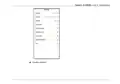
Yes, you can enable band-steering function on the WI-FI setting from either APP or WebGUI. Band
Steering will use one SSID for both 2.4 and 5GHz Wi-Fi, and Dynalink Router will steer the client devices to the
Wi-Fi band with best performance automatically.
Dynalink APP

| General | Details |
|---|---|
| Name | Dynalink DL-WRX36 WiFi 6 AX3600 Router User Guide |
| Make | DynaLink |
| Language | English |
| Filetype | PDF (Download) |
| File size | 1.36 MB |
 (1 votes, average: 5.00 out of 5)
 Loading...
If you have any questions regarding Dynalink DL-WRX36 WiFi 6 AX3600 Router User Guide, please ask here and describe the problem in detail.

Dynalink AX3600 Stream WiFi Router User Guide


Woodpeckers Multi Router Instruction Manual

MERCUSYS BE3600 Dual-Band Wi-Fi 7 Router Installation Guide

TP-Link Archer C54 Dual Band Wi-Fi Router Installation Guide

hitron CGNM-2250 Cable Modem Router User Guide

D-LINK DWM-311 LTE Portable Router User Manual

HiKOKI M12VE Variable Speed Router Instruction Manual

HORIZON HZ51 5G Wi-Fi 6 Router User Guide

TELRAN COMMUNICATION EX-5401-B1 SFP Fiber Router Wi-Fi 6 Support Mesh Instruction Manual

ZYXEL FWA505 Nebula Router User Guide

ASUS AX7800 Tri Band WiFi Router User Guide
Table of Contents
- 1. Dynalink Dl-wrx36 - Faq & Troubleshooting →
- 2. What Is Wi-fi 6? - Login, Password, Firmware And Reset →
- 3. Configuratio - Dynalink App →
- 4. Troubleshooting - Webgui →
- 5. Before You Buy - What Is Wi-fi 6? →
- 6. Installation - Setup →
- 7. 4ghz Vs 5ghz Frequency Characteristics - Ghz Channel Options... →
- 8. Login,password,firmw... - Password&timezone →
- 9. What If I Forget My Login Password? - How To Reset Dl-wrx36 ... →
- 10. Factory Reset - Reset The Router To Default Via Webgui Or Ap... →
- 11. Dynalink - Faq & Troubleshooting →
- 12. Firmware Update Importance - Firmware File Availability →
- 13. Faq & Troubleshooting - Quick Installation Guide →
- 14. Launch The Dynalink Ap - How To Update The Routers Firmware ... →
- 15. Update To The Latest Firmware Version →
- 16. Dynalink - Faq & Troubleshooting →
- 17. Update To The Latest Firmware Version - What If I Cannot Con... →
- 18. Features - Dhcp Normal Mode →
- 19. Dynalink Dl-wrx36 Installation Guide →
- 20. Dynalink Router Setup - Dynalink Router Configuration →
- 21. Dynalink - Faq & Troubleshooting →
- 22. Router Mode (by Default) - Access Point (bridge) Mode →
- 23. Dynalink Dl-wrx36 Installation - Dynalink Dl-wrx36 Configura... →
- 24. Configuration →
- 25. Dynalink - Faq & Troubleshooting →
- 26. Dynalink Dl-wrx36 - Faq & Troubleshooting →
- 27. Installation - Setup →
- 28. Dynalink Wi-fi 6 Ax3600 Router Setup - Band-steering Functio... →
- 29. Dynalink - Faq & Troubleshooting →
- 30. Lan Security →
- 31. How To Set Up Pptp Vpn Client On The Dynalink Router? - Go T... →
- 32. Enter Username And Password - Enable Default Router →
- 33. Dynalink Dl-wrx36 Installation - Connection Status →
- 34. How To Set Up Openvpn Server On The Dynalink Router? - Login... →
- 35. Modify Your Ovpn File Manually To Update Your Correct Ip Add... →
- 36. Faq & Troubleshooting - Replace Ip Address In Client.ovpn →
- 37. Your Dynalink Router Connects To A Modem In Most Cases. - Se... →
- 38. How To Set Up Openvpn Client On The Dynalink Router? - Setti... →
- 39. Go To Webgui > Security > Vpn > Vpn Client - Select Vpn Type... →
- 40. Dynalink Dl-wrx36 Installation Guide →
- 41. Dynalink App (android / Ios) - Connected Devices →
- 42. Dynalink Dl-wrx36 Installation/setup/c... →
- 43. Dynalink Webgui - Parental Control →
- 44. Client Acl →
- 45. Dynalink App - Webgui →
- 46. Setup Dynalink Account - Configuring Dynalink Router →
- 47. Compatibility - Dynalink Router Support For Amazon Fire Tv D... →
- 48. Dynalink - Faq & Troubleshooting →
- 49. Webgui - Network →
- 50. Dynalink - Faq & Troubleshooting →
- 51. Dynalink Dl-wrx36 Faq & Troubleshooting →
- 52. If You Have A Centurylink Modem/router, You Can Connect Dyna... →
- 53. Dynalink Dl-wrx36 - Faq & Troubleshooting →
- 54. Dynalink - Faq & Troubleshooting →
- 55. Dynalink Wi-fi Setup - Best Performance Tips →
- 56. Installation With Comcast Xfinity Internet - Troubleshooting... →
- 57. Faq & Troubleshooting - Led Indicator Issues →
- 58. Troubleshoot The Router Hardware - Ping The Router From Your... →
- 59. The Default Gateway Ip Of The Router Is 192.168.216.1 Type '... →
- 60. Dynalink Dl-wrx36 Faq & Troubleshooting →
- 61. Dynalink Dl-wrx36 Installation Guide →
- 62. Wi-fi Connection Quality - Verify Wi-fi Network Name (ssid) ... →
- 63. Webgui - Access To The Internet →
- 64. Internet Connection Type - Mtu Value Configuration →
- 65. Wi-fi Connectivity - Cannot Find The 2.4/5ghz Wi-fi Network →
- 66. Installation Of Drivers For Intel Wi-fi Adapters - Troublesh... →
- 67. Network Configuration - Wi-fi Settings →
- 68. Dynalink App & Google Assistant - Cannot Find Dynalink Regis... →
- 69. Disable My Router Guest Network - Turn On My Router Led →
- 70. How To Unbind My Current Account From Dynalink App - Note: P... →
- 71. Dynalink - Faq & Troubleshooting →
- 72. Faq & Troubleshooting →
- 73. Upgrade Device Firmware - Register Dynalink Account →
- 74. Changing Network Frequency Band - Accessing The Internet And... →
- 75. Network Security - Dynalink App →
- 76. Dynalink - Faq & Troubleshooting →
- 77. Webgui > System Settings > Password & Timezone →
- 78. Dynalink Dl-wrx36 Faq & Troubleshooting →