
TP-Link Archer MR500 AC1200 Wireless Dual Band Gigabit Router User Guide
















Chapter 13
TP-Link Cloud Service
13 1 Register a TP-Link ID
If you have skipped the registration during the Quick Setup process, you can:
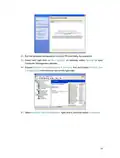
Visit http://tplinkmodem.net, and log in with the password or your TP-Link ID.
1. Go to Basic > TP-Link Cloud.
2. Click Register Now and follow the instructions to register a TP-Link ID.
3. After activating your TP-Link ID, come back to the TP-Link Cloud page to log in. The
TP-Link ID used to log in to the router for the first time will be automatically bound as
an Admin.
Note:
•
•
•
To learn more about the Admin and User TP-Link ID, refer to Manage the User TP-Link IDs.
Once the router is bound to your TP-Link ID, you need to log in to the router with the TP-Link ID.
Once you have registered a TP-Link ID on the web management page, you can only register another TP-Link ID via the
Tether APP. Please refer to Manage the Router via the TP-Link Tether App to install the app and register a new one.
If you want to unbind the admin TP-Link ID from your router, please go to Basic > TP-Link Cloud, an click Unbind in the
Device Information section.
•
13 2 Change Your TP-Link ID Information
Follow the steps below to change your email address and password of your TP-Link ID
as needed.
1. Visit http://tplinkmodem.net, and log in with your TP-Link ID.
2. Go to Basic > TP-Link Cloud, and focus on the Account Information section.
•
To change your email address:
1. Click behind the Email.
2. Enter the password of your TP-Link ID, then a new email address. And click Save.
84

| General | Details |
|---|---|
| Name | TP-Link Archer MR500 AC1200 Wireless Dual Band Gigabit Router User Guide |
| Make | TP-Link |
| Language | English |
| Filetype | PDF (Download) |
| File size | 1.32 MB |
 (1 votes, average: 5.00 out of 5)
 Loading...
If you have any questions regarding TP-Link Archer MR500 AC1200 Wireless Dual Band Gigabit Router User Guide, please ask here and describe the problem in detail.

TP-Link VR300 Archer Modem Router User Guide

TP-Link T150500-2-DT WiFi Router Instruction Manual

TP-Link Archer AX55 Wi-Fi 6 Router Installation Guide

TP-Link Omada ER8411 VPN Router Instructions

TP-Link Configure VDSL Router User Guide

TP-Link Archer BE805 BE19000 Tri-Band Wi-Fi 7 Router User Manual

TP-Link VR600 Wireless DSL Modem Router Installation Guide

TP-Link AX58 Dual Band Gigabit Wi-Fi 6 Router Installation Guide

TP-Link AC750 Wireless Dual Band Router Owner’s Manual

TP-Link AX6000 8-Stream Wi-Fi 6 Router Installation Guide


Linksys WRT300N Wireless-N Broadband Router User Guide

ASUS EBG19P Gigabit PoE Plus VPN Wired Router User Guide
REPUBLIC OF GAMERS GT-BE19000 WiFi 7 Tri Band Gaming Router User Guide

TOTOLINK X2000R AX1500 Wireless Dual Band Gigabit Router Installation Guide

Imou AC1200 Dual Band WIFI Router User Guide

NETGEAR RS300S Nighthawk Tri Band WiFi 7 Router Instructions

NEXXT NCM-X3000 Bolt AX3000 Router User Guide

EtherWAN EasyCell Hardened 4G LTE CAT4 Router Installation Guide
Guangdong Xintengda Communication Technology WR300N-XXX WiFi Router Instruction Manual

Cudy P5 5G NR AX3000 Wi-Fi 6 Router Installation Guide