
Tenda AC1200 WiFi 6 Router Installation Guide






















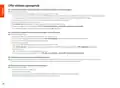

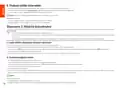


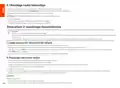



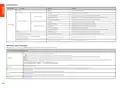


LED indicator
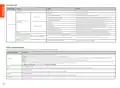
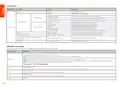
LED indicator
Scenario
Status
Description
Solid green
Solid green
The system is starting up.
The router is connected to the internet.
Startup
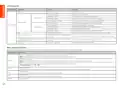
Blinking green slowly
Blinking red slowly
Not configured and the router is not connected to the internet.
Configured but the router failed to connect to the internet.
Primary node
Blinking orange slowly
Configured but no Ethernet cable is connected to the WAN port.
Networking succeeds. Good connection quality.
Internet connection
Solid green
LED indicator
Solid orange
Networking succeeds. Fair connection quality.
Networking succeeds. Poor connection quality.
Waiting to connect to another node.
Secondary node
Solid red
Blinking green slowly
Blinking red slowly
Configured but the router failed to connect to the internet.
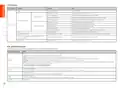
WPS
Blinking green quickly
Pending for or performing WPS negotiation (valid within 2 minutes)
Ethernet cable connection
Blinking green quickly for 3 seconds
A device is connected to or disconnected from an Ethernet port of the router.
PPPoE user name and password importing (only for
primary node)
Blinking green quickly for 8 seconds
Blinking orange quickly
PPPoE user name and password are imported successfully.
Restoring to factory settings.
Resetting
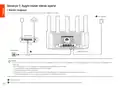
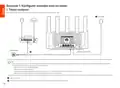
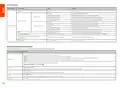
Jack, ports and buttons
The jacks, ports and buttons may vary with models. The actual product prevails.
Jack/Port/Button
Description
Used to start the WPS negotiation process, or to reset the router.
− WPS: Through the WPS negotiation, you can connect to the WiFi network of the router without entering the password.
Method: Press the button 1-3 seconds, and the LED indicator blinks green fast. Within 2 minutes, enable the WPS function of the other WPS-supported device to establish a WPS connection.
- Mesh: When it is used as a Mesh networking button, you can extend your network with another device that supports the Mesh function.
Method: Press this button for about 1-3 seconds. The LED indicator blinks green fast, which indicates the device is searching for another device to form a network. Within 2 minutes, press the
MESH/WPS button of another device for 1-3 seconds to negotiate with this device.
WPS/RST
- Reset method: Refer to Q3 in FAQ.
Gigabit LAN/IPTV port.
3/IPTV
1, 2
It is a LAN port by default. When the IPTV function is enabled, it can only serve as an IPTV port to connect to a set-top box.
Gigabit LAN port.
Used to connect to such devices as computers, switches and game machines.
Gigabit WAN port.
WAN
Used to connect to a modem or the Ethernet jack for internet access.
POWER
Power jack.
03

| General | Details |
|---|---|
| Name | Tenda AC1200 WiFi 6 Router Installation Guide |
| Make | Tenda |
| Language | English |
| Filetype | PDF (Download) |
| File size | 3.6 MB |
 (1 votes, average: 5.00 out of 5)
 Loading...
If you have any questions regarding Tenda AC1200 WiFi 6 Router Installation Guide, please ask here and describe the problem in detail.

Tenda AXE5700 Wi-Fi 6E Router User Manual

Tenda AX1800 Wi-Fi 6 5G NR Router User Manual

Tenda RX2LP Dual Band Gigabit Wi-Fi 6 Router Installation Guide

Tenda TX2L ProV1.0 WiFi 6 Router Installation Guide

Tenda RX12V1.0 Wi-Fi 6 6E Router Installation Guide

Tenda 4G09V1.0 Wifi Router User Manual

Tenda AC19 Dual Band Gigabit WiFi Router Installation Guide

Tenda 4G06V1.0 4G LTE and VoLTE Router User Guide

Tenda 4G03 N300 Wi-Fi 4G LTE Router Installation Guide

Tenda N300 WiFi VDSL/ADSL Modem Router V300 Installation Guide


ASUS TUF-AX6000 Dual Band WiFi Router User Guide

KAON BROADBAND AR1840 WiFi Router Installation Guide

DRAPER PT1202VSF 1200W 230V Variable Speed Router Instruction Manual

Woodpeckers REV033122 Multi Router Instructions

TP-Link ER706W Wi-Fi Gigabit VPN Router User Guide

ASUS DSL-N66U Dual Band Wi-Fi ADSL VDSL Modem Router User Manual

TDS Fiber Internet Wireless Router Instructions

Tenda AC9 AC1200 Dual Band Gigabit WiFi Router Installation Guide

BIGXI AX1800 Wireless Router Installation Guide

Actiontec WF-815 Tri-Band Wi-Fi6E Router Owner’s Manual